



How to Photograph Items for Classified Ads
If you change one thing about how you list items, change the photographs. Buyers scroll quickly and the first image decides whether they stop or keep going. You do not need a good camera — you need daylight, a clear background, and about ten minutes.
What this covers
Key takeaways
- Daylight beats every other variable. Never use flash.
- A clear background makes an ordinary item look cared for.
- Take six to eight angles, not one.
- Photograph the flaws — it filters out buyers who would have walked away.
- Your first image is the thumbnail across the entire site. Choose it deliberately.
Why photographs matter more than description
Buyers browsing a category see a grid of thumbnails. At that moment they are not reading anything — they are scanning images and deciding, in a fraction of a second, which ones to open.
A well-written description cannot rescue a listing nobody clicks. And once they do click, photographs answer the questions that matter most to a second-hand buyer: what condition is it really in, and is the seller being straight with me?
What you actually need
Almost nothing. A phone from the last five years takes photographs perfectly good enough for classified listings. What you need instead:
- A window, or an overcast day outdoors
- A clear surface — table, floor, or plain wall
- A cloth to clean the item first
- Ten minutes, unhurried
This is the highest-return ten minutes in the entire selling process. Dust, fingerprints and smears read as neglect, and buyers deduct money for them before they have asked a single question.
Light: the one thing that matters most
Get the light right and everything else is forgiving. Get it wrong and no amount of framing rescues the shot.
Shoot near a window
Indirect daylight is the most flattering light there is, and it costs nothing. Position the item beside the window, not in front of it.
Overcast days are ideal outdoors
Cloud acts as a giant diffuser. Bright direct sun creates harsh shadows and blown-out highlights.
Turn the flash off
Phone flash flattens texture, throws hard shadows and gives fabric and paintwork an unpleasant sheen. There is no listing it improves.
Avoid overhead room lights
They cast a yellow-orange tint and shadow the top surfaces. If daylight is impossible, wait for morning.
Do not stand between the light and the item
Your own shadow across the subject is the most common avoidable error.
Artificial light distorts colour, and buyers reading a yellow-tinted photo assume the item is stained, worn or older than it is. If it is dark, wait until morning. One night’s delay is worth it.
Backgrounds and staging
The background says as much about you as the item does. A cluttered kitchen worktop suggests a careless seller; a plain surface suggests someone who has looked after their things.
| Item type | Good background | Avoid |
|---|---|---|
| Small electronics | Plain table, light wall | Patterned surfaces, cables in frame |
| Clothing | Hanging against a plain door | Crumpled on a bed |
| Furniture | In a tidy room, in context | Surrounded by unrelated clutter |
| Vehicles | Open space, clean surroundings | Narrow driveway, other cars in shot |
| Tools | Plain workbench or floor | A disorganised pile |
| Jewellery | Plain neutral cloth, close up | Busy patterns, poor focus |
Furniture is the exception to plain backgrounds. A sofa photographed in a tidy living room helps buyers picture it in theirs, and gives an immediate sense of scale that a blank wall cannot.
Photos ready?
Upload as many as you like, free. Your ad reaches buyers across 238 countries.
Which shots to take
More photographs means fewer questions, and fewer questions means less of your time spent replying. Aim for six to eight:
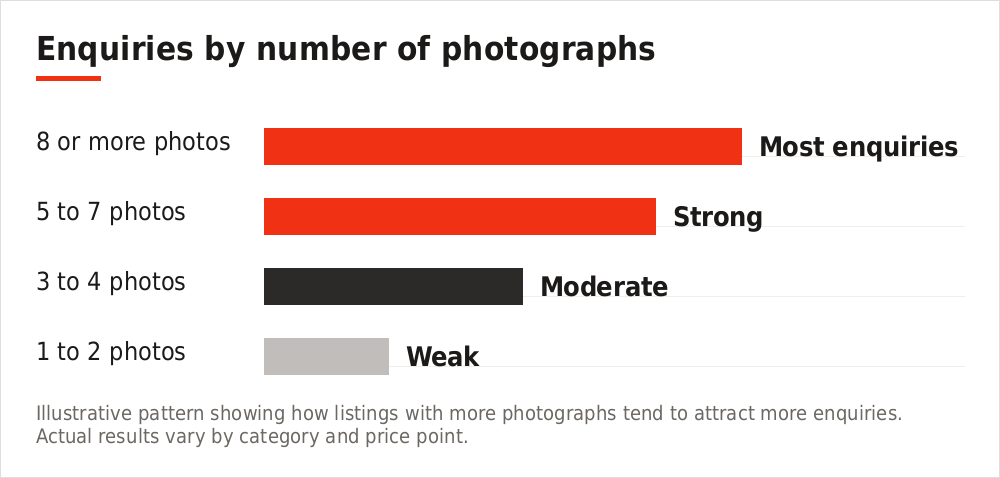
Illustrative pattern showing how listings with more photographs tend to attract more enquiries. Actual results vary by category and price point.
- The hero shot — whole item, well lit, best angle. This becomes your thumbnail.
- Front and back — straight on, both sides
- Left and right — profile views
- Top or underneath — whichever is more revealing
- Model or serial plate — proves specification and authenticity
- Any flaw — one clear close-up per defect
- What is included — everything laid out together
- Scale reference — a hand, a coin, or the item in a room
Photographing flaws deliberately
This feels wrong to most sellers. It is the most valuable habit in the entire guide.
A buyer who sees the scratch in your photographs and travels to view the item anyway is a buyer who has already accepted it. A buyer who discovers the same scratch on arrival feels misled, and walks — costing you an afternoon and often a second listing cycle.
One close-up per flaw
Chip, scratch, stain, worn edge, missing part. Clear and well lit.
Reference them in the description
“Small chip on the rear corner, shown in photo 6” reads as honesty and builds immediate trust.
Do not apologise for them
State the flaw plainly. Second-hand buyers expect wear; what they do not tolerate is surprise.
Category-specific advice
| Category | Photograph this specifically |
|---|---|
| Phones and laptops | Screen powered on, battery health screen, ports, corners, charger |
| Cars | All four corners, interior front and rear, dashboard with mileage, tyres, service book, any damage |
| Furniture | In situ for scale, joints and legs, underside, upholstery close-up |
| Clothing | Hanging flat, care label, brand label, any marks, fabric texture |
| Bicycles | Drive side profile, gears, brakes, frame size marking, tyre wear |
| Appliances | Powered on, model plate, interior, seals, any rust or wear |
| Tools | Full set laid out, blade or bit condition, case, powered on if electric |
Editing: what is fair
A light touch is reasonable. Anything that changes what the buyer will actually receive is not.
| Fair | Not fair |
|---|---|
| Cropping to remove clutter | Cropping out damage |
| Straightening a tilted shot | Editing out scratches or stains |
| Modest brightness correction | Heavy filters that change colour |
| Rotating to the right orientation | Using manufacturer stock images |
Buyers of second-hand goods want to see your item in its condition. A catalogue image signals that something is being hidden, and it is one of the most common reasons a listing is rejected at moderation.
Ten photo mistakes
- One photograph only. The most common and most costly.
- Taken at night under a ceiling light. Yellow, shadowed, unappealing.
- Flash on. Flattens everything.
- Cluttered background. Reads as a careless seller.
- Your shadow across the item. Move.
- Blurry or out of focus. Tap the screen to focus and take three.
- Sideways or upside down. Rotate before uploading.
- No scale reference. “Large” means nothing on its own.
- Hiding the damage. It surfaces at the viewing anyway.
- Weak first image. It is the thumbnail everyone sees first.
Frequently asked questions
How many photographs should I upload?
Six to eight for most items. Vehicles and property justify more — a car listing can reasonably carry fifteen.
Do I need a proper camera?
No. Any reasonably recent phone is fine. Light and background matter far more than the device.
Should I use a white background?
Plain and uncluttered is what matters — white is not required. For furniture, a tidy room often works better than a blank wall.
Can I use photos from the original listing when I bought it?
No. Buyers need to see the item in its current condition, and reused images are a common cause of rejection at moderation.
Should I add a watermark?
Generally no. It makes photographs harder to read and rarely prevents misuse. If you are a business seller, a small discreet mark in a corner is acceptable.
What if the item is very large?
Photograph it in context so buyers understand scale, then take close-ups of the important details separately.
The short version
Clean it. Take it to a window. Turn the flash off. Shoot eight angles including every flaw. Pick the brightest, clearest shot as your first image. That is the whole method, and it will outperform almost every other listing in your category.
Upload them and start selling
Free to post, free to sell, no commission. Buyers across 238 countries and 3,047 regions.
You can also explore the full marketplace across every category.