


How to Search Classified Ads More Effectively
Most classified platforms return results ordered by recency, filtered by whatever you typed. That sounds simple, and it means the difference between a good search and a poor one is enormous — most buyers see a small fraction of what is actually available to them.
What this covers
Key takeaways
- Search matches text the seller typed — if they phrased it differently, you will not see it.
- Run several searches with different wording rather than one perfect one.
- Over-filtering excludes the badly written listings that offer the best value.
- Browsing a whole category surfaces what filters miss.
- Save your searches so good listings come to you instead.
How classified search actually works
It is worth understanding the mechanism, because it explains every technique that follows.
When you search, the platform looks for your words in listing titles and descriptions, then applies your filters, then orders what remains — usually by how recently it was posted. There is no algorithm inferring what you meant. If the seller wrote “settee” and you searched “sofa”, you will not see it.
Choosing search terms
The single most useful habit is running several searches instead of one.
| Search type | Example | Catches |
|---|---|---|
| Exact model | Trek Marlin 7 | Well-written listings |
| Brand only | Trek | Listings omitting the model |
| Generic description | mountain bike medium | Sellers who do not know the brand |
| Alternative words | settee, couch, sofa | Regional and generational vocabulary |
| Common misspellings | Specialised, Specialzed | Listings nobody else finds |
| Model number alone | 9310 | Technical sellers who omit branding |
A dealer writes “Ercol Windsor dining chairs, set of four”. Somebody clearing a late relative’s house writes “4 old wooden chairs”. Both listings are for the same thing, and only one of them appears in the obvious search.
Using filters without over-filtering
Filters are precise, which is both their value and their danger. Every filter you apply removes listings, including ones you would have wanted.
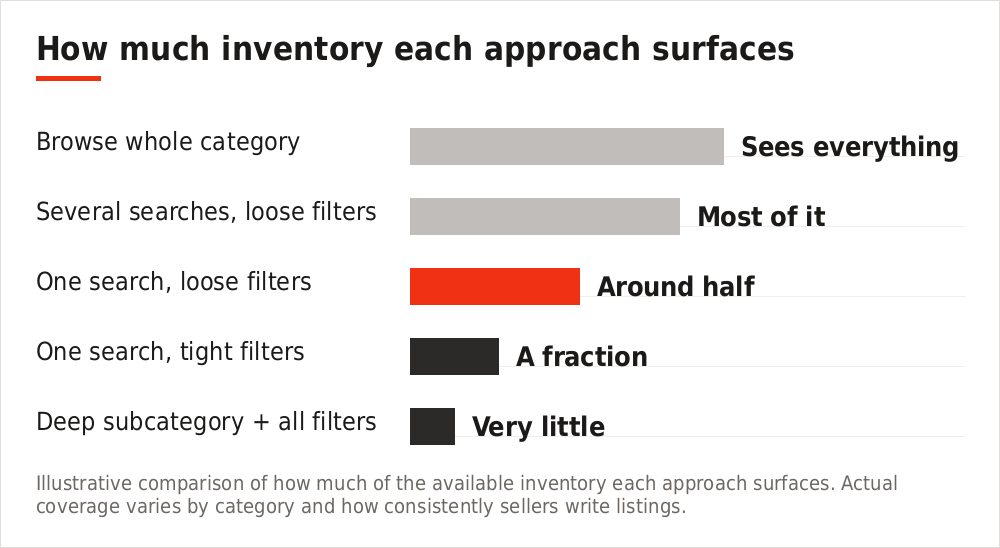
Illustrative comparison of how much of the available inventory each approach surfaces. Actual coverage varies by category and how consistently sellers write listings.
| Filter | Use it | Careful |
|---|---|---|
| Category | Broad parent category | Deep subcategories miss misfiled items |
| Price | Generous upper bound | Tight ranges miss mispriced bargains |
| Distance | What you would genuinely travel | Too tight for specialist items |
| Condition | Rarely | Sellers grade inconsistently |
| Specification | When it genuinely matters | Many sellers leave fields blank |
If a seller did not fill in the year, mileage or size field, applying that filter removes their listing entirely — even when the information is written plainly in the description. This is why filtering hard on specification often hides exactly what you are looking for.
Search across 238 countries
Filter by distance, category and price — or browse the whole category. Free either way.
When to browse instead
For anything where you are open to options rather than hunting one exact item, browsing beats searching.
- Furniture — you will recognise the right piece when you see it
- Anything vintage — sellers rarely use the terms collectors would
- House clearances — mixed lots that no search term describes
- Local categories generally — volumes are small enough to scan
- When you have searched repeatedly without success
Sort a whole category by newest and scan it. It takes minutes and shows you everything, including the listings whose titles would never have matched anything you typed.
Getting the distance right
Distance is the filter people set most carelessly, usually far too tight.
| Item | Sensible radius |
|---|---|
| Low-value bulky furniture | Very local — transport dominates the cost |
| Everyday household items | A short drive |
| Electronics and tools | Wider — small enough to collect easily |
| Vehicles | Nationwide — people travel for the right one |
| Specialist equipment | Nationwide or international |
| Collectables | International — postable and rare |
Sorting and what it hides
- Newest first — the default for good reason. Best listings go fast, so this is where you find them.
- Price ascending — useful, but the very cheapest results are often faulty items or listings with placeholder prices.
- Price descending — occasionally reveals mispriced items where a seller has added an extra digit.
- Distance — helpful for bulky goods where collection is the constraint.
Whichever you choose, remember that sorting only orders what your filters already allowed through. Sorting cannot show you what filtering removed.
Saving searches
The best listings are claimed within hours, which means browsing shows you what nobody else wanted. A saved search reverses that: matching items are sent to you as they appear.
Set them broader than feels comfortable, run several with different phrasings, and accept some irrelevant results as the cost of catching the poorly titled listings that represent real value.
Assessing results quickly
Scan the thumbnail first
A clear, well-lit photograph usually indicates a seller who has taken care generally.
Check the price against your reference
You need to know the going rate before you can recognise anything unusual.
Read the whole description
Details omitted from the title are frequently in the text, including flaws.
Note the listing age
Something posted weeks ago suggests a seller who may now be flexible.
Judge the effort
Eight photographs and full measurements signal a straightforward transaction ahead.
Frequently asked questions
Why can I not find something I know is listed?
Almost always because the seller described it differently. Try alternative words, the brand alone, or browse the category directly.
Should I use lots of search words?
No. More words means fewer matches. Two or three specific terms usually work better than a full description.
How often should I search?
Daily for competitive categories, or set a saved search and let the alerts do it.
Is it worth searching in other languages?
For international items, yes. Sellers list in their own language and those listings have far less competition.
Why do results change between searches?
New listings appear and sold ones are removed constantly. Results ordered by recency shift throughout the day.
Can I search a specific seller?
You can view a seller’s other listings from any of their ads, which is useful when someone is clearing a whole collection.
The short version
Run several searches with different wording rather than one. Filter loosely, especially on condition and specification. Browse whole categories when you are open to options. Widen the distance for anything small or valuable. And save your searches so the good listings find you.
Start searching, free
478 categories across 238 countries, with no commission on anything you buy or sell.
You can also explore the full marketplace across every category.