



What to Check Before Buying Used Electronics
Used electronics are among the best value purchases available and among the easiest to get wrong. A phone that looks perfect can be network-locked, account-locked or stolen; a laptop can have a swollen battery or a failing drive. Fifteen minutes of checks removes almost all of that risk.
What this covers
Key takeaways
- Always test with the device powered on. A black screen hides a great deal.
- Check the device is signed out of the seller’s account before you pay.
- Ask for the IMEI or serial before travelling, and check it.
- Battery health matters more than cosmetic condition on portable devices.
- A price far below market on electronics is a reason to check harder, not to hurry.
Checks before you travel
Most wasted journeys are avoidable with three or four messages.
- Ask for the exact model and specification — and check it matches the photographs
- Request the IMEI or serial number — a genuine seller has no reason to refuse
- Ask whether it is unlocked and whether any account is still signed in
- Ask for battery health on anything portable
- Confirm what is included — charger, cables, box, original accessories
- Ask whether it has been repaired and whether parts were original
- Request a photograph of it switched on, showing the home screen
It proves the screen works, that the device boots, and that the seller physically has it. Sellers with something to hide tend to become vague at this point, which tells you what you need to know before you leave the house.
Phones and tablets
Check it is signed out
An iPhone still signed into iCloud stays Activation Locked; an Android signed into a Google account stays FRP-locked. In both cases the device is unusable to you. It should be at the initial setup screen.
Verify the IMEI
Dial *#06# to display it and check it matches the box, the settings menu and anything the seller told you in advance.
Check battery health
Settings on iPhone; a diagnostics app or code on most Android devices. Below roughly 80% expect to replace it.
Test both cameras and all sensors
Front and rear cameras, flash, autofocus, speaker, microphone, face or fingerprint unlock.
Inspect the screen carefully
Look for cracks under the glass, dead pixels, discolouration and touch dead zones. Open a white image and a black one.
Test charging
Bring a cable. Wireless charging too if the model supports it.
Once you have paid and left, you have no leverage at all. The device must be signed out and reset before money changes hands, without exception.
Laptops and computers
| Check | How | Why |
|---|---|---|
| Specification matches | System settings or About page | Confirms processor, memory and storage |
| Battery condition | Battery report or health screen | Replacement is a real cost |
| Screen condition | White and black full-screen images | Dead pixels, backlight bleed, dim panels |
| Keyboard and trackpad | Type every key; test gestures | Common wear points |
| Ports | Plug something into each | Individual ports fail |
| Hinges and casing | Open and close; check it sits flat | A lifting case can mean a swelling battery |
| Fan noise under load | Open several applications | Grinding suggests bearing failure |
| Firmware password | Ask directly | Some cannot be cleared without the manufacturer |
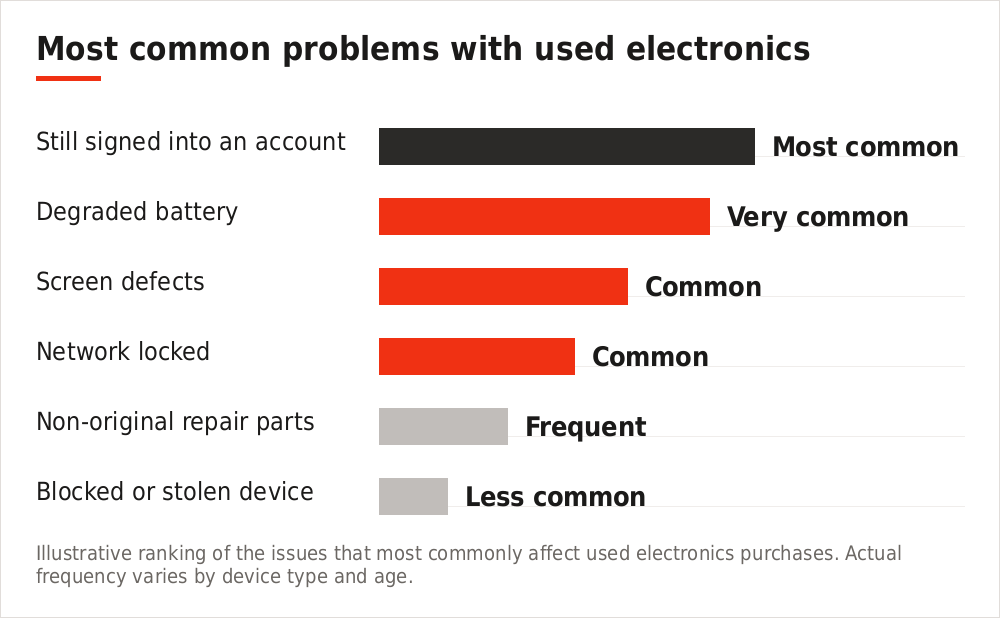
Illustrative ranking of the issues that most commonly affect used electronics purchases. Actual frequency varies by device type and age.
Buy and sell electronics directly
No commission built into the price. Free to list, free to sell.
Televisions and monitors
- View a full white screen to reveal dead pixels, stains and uniformity problems
- View a full black screen to reveal backlight bleed and clouding
- Check for image retention on OLED panels — ask what it has displayed regularly
- Test every HDMI port, not just one
- Check the remote is present and working
- Inspect the stand and mounting points for damage
- Test the speakers at moderate volume
Audio equipment
Test at low, medium and high volume. Listen for crackle, distortion and channel imbalance, and check every input.
- Speakers — check cones for splits, and listen for buzzing at volume
- Amplifiers — test all inputs; scratchy volume controls suggest worn potentiometers
- Headphones — check both channels, cable at the jack, and pad condition
- Turntables — check the stylus, that the platter spins evenly, and speed accuracy
Cameras and lenses
Check the shutter count
The equivalent of mileage. Ask before travelling, and verify on the camera or a saved image.
Inspect the sensor
Photograph a plain bright surface at a small aperture. Dust shows as dark spots; scratches are far more serious.
Check lens elements
Hold to a light and look for fungus, haze and separation. Fungus in particular is difficult and expensive to treat.
Test focus and aperture
Run through the full focus range and every aperture setting. Listen for grinding.
Test all controls and card slots
Every dial, button, and both slots if fitted.
Making sure it is not stolen
Electronics are the most commonly stolen category, so buyers should be reasonably careful. A legitimate seller will not object to any of this.
- Ask for the original receipt where they have it
- Check the IMEI or serial against any check service available where you are
- Confirm the device is signed out of all accounts
- Be wary of a price far below market with a vague explanation
- Meet somewhere public, or at the seller’s home address
- Be cautious if the seller cannot answer basic questions about the device’s history
If a device is later identified as stolen it can be blocked or seized, and you will have no recourse against the seller. The unusually low price is not a bargain — it is the reason to check harder.
When to walk away
- The device is not signed out and the seller wants to “do it later”
- The IMEI or serial does not match what you were told
- The seller will not let you power it on or test it properly
- There is a firmware or BIOS password they cannot clear
- The casing is lifting or a battery looks swollen
- The story about where it came from keeps changing
- You are being rushed
Frequently asked questions
How much should I expect to save buying used?
Typically 30–60% off new for devices a year or two old, more for older models. Compare against current new prices, not the original launch price.
Is it safe to buy a phone without the box?
Yes — the box adds a little value but nothing functional. What matters is that it is unlocked, signed out and not blocked.
What battery health is acceptable?
Above 85% is good, 80–85% is usable, below 80% means factoring in a replacement.
Should I buy a cracked-screen device?
Only if you have priced the repair first and the total still represents value. Cracks can also mask internal damage.
Can I test a laptop properly at a meeting?
Yes, if you meet somewhere with a power socket. A café works well and fifteen minutes is enough.
What if it fails a week later?
Private sales generally carry no warranty. This is exactly why thorough testing before payment matters so much.
The short version
Ask for the serial and a powered-on photograph before travelling. Check it is signed out of every account before paying. Test the screen with white and black images, test every port, and check battery health. And treat an unusually low price as a reason to look harder rather than move faster.
Buy directly, with no added commission
Free to list, free to sell, and you deal with the other party yourself.
You can also browse listings across 238 countries before you settle on a price.